# [Download jQuery Manager](https://downloads.wordpress.org/plugin/jquery-manager.zip) (WordPress plugin)
[](https://github.com/Remzi1993/jquery-manager/releases/latest)
[](https://github.com/Remzi1993/jquery-manager/issues)
[](https://github.com/Remzi1993/jquery-manager/network/members)
[](https://github.com/Remzi1993/jquery-manager/stargazers)
[](https://github.com/Remzi1993/jquery-manager/blob/master/LICENSE)
[](https://app.fossa.io/projects/git%2Bgithub.com%2FRemzi1993%2Fjquery-manager?ref=badge_shield)
[](https://travis-ci.com/Remzi1993/jquery-manager)
[](https://codeclimate.com/github/Remzi1993/jquery-manager/maintainability)
[](http://makeapullrequest.com)
[](https://www.firsttimersonly.com)
# jQuery Manager for WordPress
jQuery Manager for WordPress is an open source project and I would like to invite anyone to contribute. The development and issue tracker is located here on GitHub.
## About this debugging tool
Manage jQuery and jQuery Migrate on a WordPress website, activate/select a specific jQuery and/or jQuery Migrate version. The ultimate jQuery debugging tool for WordPress.
## Why yet another jQuery Updater / Manager / Developer / Debugging tool?
Because none of the developer tools let's you select a specific version of jQuery and/or jQuery Migrate. Providing both the compressed minified / production and the uncompressed / development version. See features below! :trophy:
:white_check_mark: **Turn on/off** jQuery and/or jQuery Migrate
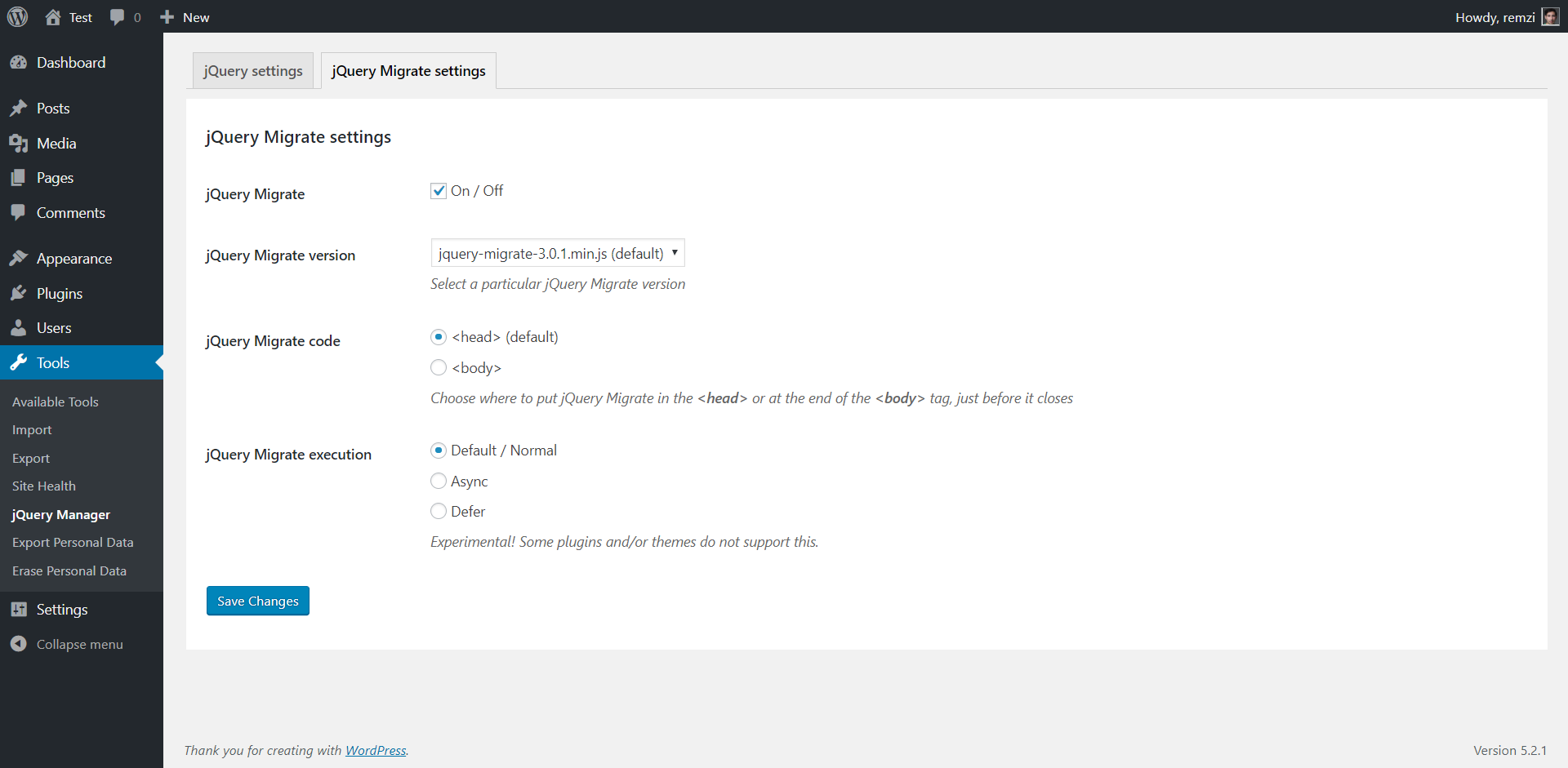
:white_check_mark: Activate a **specific version** of jQuery and/or jQuery Migrate
:white_check_mark: Choose how to load **jQuery Migrate** in the **`Head`** or at the end of the **`Body`** **What's the effect?** [source 1](https://flaviocopes.com/javascript-async-defer/)
:white_check_mark: **`Async`** or **`defer`** jQuery and/or jQuery Migrate **What's the effect?** [source 2](https://www.growingwiththeweb.com/2014/02/async-vs-defer-attributes.html), [source 3](https://bitsofco.de/async-vs-defer/)
:white_check_mark: Development done using [WordPress Coding Standards](https://make.wordpress.org/core/handbook/best-practices/coding-standards/), also a lot of "jQuery Updater" plugins are outdated and/or buggy / bloated
:white_check_mark: Only executed in the front-end, **doesn't interfere with WordPress admin/backend and WP customizer** (for compatibility reasons) See: https://core.trac.wordpress.org/ticket/45130 and https://core.trac.wordpress.org/ticket/37110
:new: Debug mode
:thumbsup: Active development
:thumbsup: Active support
:arrows_counterclockwise: Working on more features
## [Download](https://downloads.wordpress.org/plugin/jquery-manager.zip) jQuery Manager for WordPress
Go to the wordpress.org plugin page [wordpress.org/plugins/jquery-manager/](https://wordpress.org/plugins/jquery-manager/) and download the .zip file.
### Manual installation by uploading .zip file via WordPress admin
1. Navigate to > `Plugins` > `Add New`
2. On your top left > click on `Upload Plugin` and select the .zip file you downloaded earlier and click `Install Now`
3. By activating the plugin, jQuery and jQuery Migrate are updated to the latest stable version by default. (Plugin settings are located under `Tools`)
### Manual installation by uploading folder/directory via FTP, SFTP or SSH
1. Unzip (extract/unpack/uncompress) the .zip file you downloaded earlier
2. Upload the folder `jquery-manager` to the `/wp-content/plugins/` directory on your server
3. By activating the plugin, jQuery and jQuery Migrate are updated to the latest stable version by default.
(Plugin settings are located under `Tools`)
## I have a few people I would like to thank
[@YahnisElsts](https://github.com/YahnisElsts) for his amazing work on a updater, that we were using in this
open source project before we became an official WP plugin:
https://github.com/YahnisElsts/plugin-update-checker
[@tareq1988](https://github.com/tareq1988) for his awesome WordPress Settings API abstraction class:
https://github.com/tareq1988/wordpress-settings-api-class
I thank [@collizo4sky](https://github.com/collizo4sky) for a library which made my live easier: https://github.com/collizo4sky/persist-admin-notices-dismissal
## Bug reports
Report bugs, issues, questions and/or feature request on our GitHub
[issues](https://github.com/Remzi1993/jquery-manager/issues) page.
## Screenshots

 ## Do you want to help with development?
Working on some awesome feature or a fix? **Fork this repo** and **create a new branch** (branch name for example: feature-name or fix-name) and when you're finished do a **pull request**.
Go to your working WP plugins directory / WordPress install: `/wp-content/plugins/` this is where you want to clone this project or your forked repo in.
## Do you want to help with development?
Working on some awesome feature or a fix? **Fork this repo** and **create a new branch** (branch name for example: feature-name or fix-name) and when you're finished do a **pull request**.
Go to your working WP plugins directory / WordPress install: `/wp-content/plugins/` this is where you want to clone this project or your forked repo in.
Use the following command to clone this repository:
`$ git clone git@github.com:Remzi1993/jquery-manager.git` (example)
If you have forked this repo. You should clone your own repo. To begin working on your feature or fix you should create a branch, this will be easier for us to check your pull request later on.
### Git workflow explained
- https://opensource.guide/how-to-contribute/#opening-a-pull-request
- https://guides.github.com/introduction/flow/
- https://www.atlassian.com/git/tutorials/comparing-workflows/forking-workflow
- https://en.wikipedia.org/wiki/Fork_and_pull_model
- https://nvie.com/posts/a-successful-git-branching-model/
#### Keep your forks up to date with the upstream repo - or use the [Pull](https://github.com/apps/pull) GitHub App
- https://help.github.com/en/articles/syncing-a-fork
Tutorial: http://makeapullrequest.com
**Working on your first Pull Request?** You can learn how from this _free_ series [How to Contribute to an Open Source Project on GitHub](https://egghead.io/series/how-to-contribute-to-an-open-source-project-on-github)
[](https://wordpress.org)
## This project uses [Semantic Versioning](https://semver.org/)
Given a version number MAJOR.MINOR.PATCH:
1. MAJOR version number increases when incompatible API changes are made
2. MINOR version number increases when functionality in a backwards-compatible manner are added
3. PATCH version number increases when backwards-compatible bug fixes are made
## License
[](https://app.fossa.io/projects/git%2Bgithub.com%2FRemzi1993%2Fjquery-manager?ref=badge_large)
## First timers test - add your name below! - https://www.firsttimersonly.com
- Akhil
- tavaresjaime00
- Arun
- sharduldesai7
- Anushka
- Finewitch
- SkelleyBelly